RTNicPgW64.exe 命令参数
RTNicPgW64.exe 是 Realtek 网卡编程工具,用于配置网卡的 EEPROM 或 EFUSE。
Info
如果在执行
RTNicPgW64.exe命令过程中,触发系统蓝屏,需要 关闭 VBS 后再执行命令
使用方式
- 使用命令参数来更新 Realtek 配置信息 (如 MAC 地址,SSID 等),见 常用参数选项
- 使用
/W命令参数来使用配置文件更新对应信息,可更新更多信息 (如 LED 灯的颜色等),见 CFG 配置文件
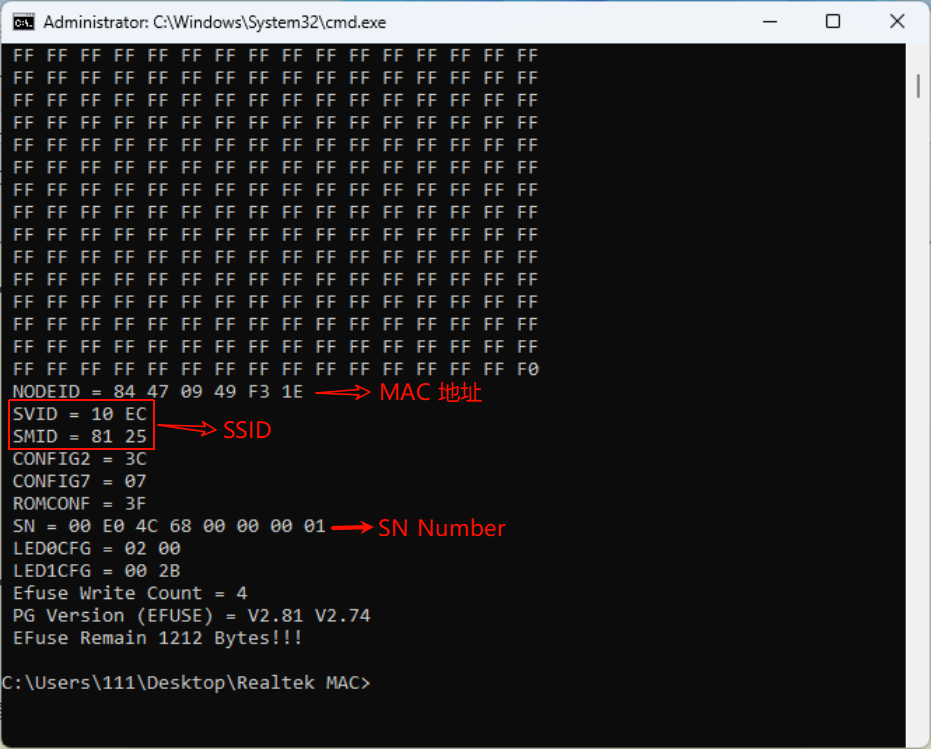
| 名词 | 描述 |
|---|---|
| NODE ID | MAC 地址 |
| SVID | |
| SMID | |
| CONFIG7 | |
| ROMCONF | |
| SN | |
| LEDCFG | LED 灯的颜色配置 |
常用参数选项
大多是在 RTNicPgW64.exe 后接 /efuse,才能执行成功
RTNicPgW64.exe /efuse
或
RTNicPgW64.exe /eeprom
| 常用参数 | 描述 |
|---|---|
/# NICNumber | 选定 NIC 端口 如果有多个端口,可通过添加参数 ,例如 /# 2,表示第 2 个端口;不添加默认为第 1 个 |
/r | 读取信息,默认读取第一个端口的信息 示例 1. RTNicPgW64.exe /efuse /r 2. RTNicPgW64.exe /efuse /r /# 2 |
/vMAC | 显示每个适配器的 SVID、SDID 和 MAC 地址 示例 1. RTNicPgW64.exe /efuse /vMac 2. RTNicPgW64.exe /efuse /vMac /# 2 |
/w | 根据配置文件 (.cfg) 写入对应信息 相对于命令参数,可修改 LED 灯的颜色灯更多信息 |
/nodeid HexNODEID | 写入 16 进制的 MAC 地址,可通过 /# 指定 NIC 端口 1. RTNicPgW64.exe /efuse /nodeid xxxxxxxxxxxx 2. RTNicPgW64.exe /efuse /nodeid xxxxxxxxxxxx /# 2 |
/barmac | 将手动输入的 MAC 地址写入;命令运行后,会提示输入 MAC 地址 示例 1. RTNicPgW64.exe /efuse /barmac 2. RTNicPgW64.exe /efuse /barmac /# 2 |
/svid HexSVID HexSMID | 写入 16 进制的 SVID 和 SMID,可通过 /# 指定 NIC 端口 1. RTNicPgW64.exe /efuse /svid xxxx(SVID) xxxx(SMID) 2. RTNicPgW64.exe /efuse /svid xxxx xxxx /# 2 |
/nchkac | 不检查电源状态,默认会检查 AC 或 DC |
/efwsn | 更新 SN - 使用/w 配置文件更新时,默认不会刷入 SN,需要添加 /efwsn 才会去写入 SN- SN 只能使用对应配置文件中的 SN 值进行修改 - 将其它值使用;注释掉,只留 SN,执行RTNicPgW64.exe /efuse /# 1 /efwsn |
/h 或 /?
- 显示帮助信息
/v
- 查看每个适配器的信息
- 默认查询所有端口信息,可通过
/#来指定端口
RTNicPgW64.exe /efuse /v
RTNicPgW64.exe /efuse /v /# 1
RTNicPgW64.exe /efuse /v /# 2
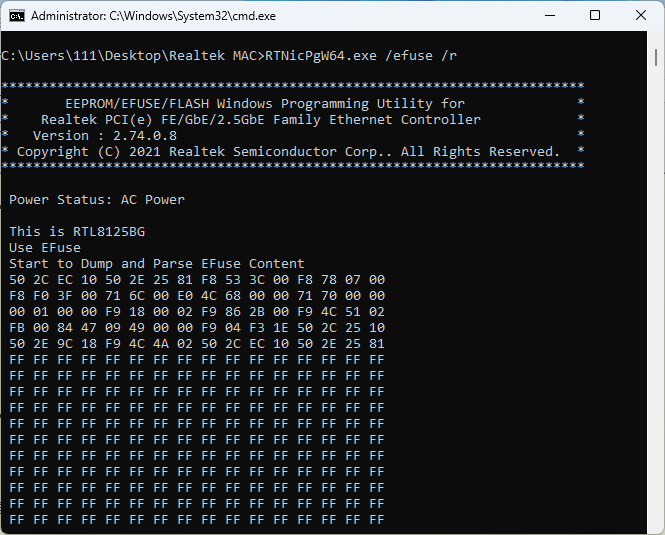
/r
- 读取 EEPROM 或 EFUSE 内容并输出到标准输出
- 默认读取第一个端口的信息;可通过
/# 2来指定读取第 2 个端口信息
RTNicPgW64.exe /efuse /r
RTNicPgW64.exe /efuse /r /# 2
/w
- 根据配置文件 (.cfg) 写入 EEPROM 或 EFUSE。这是默认操作,如果没有其他动作指定的话
/nodeid HexNODEID
- 将 NODEID 编程到 EEPROM 或 EFUSE
- 指定 MAC 地址,可添加 /# 来指定端口
RTNicPgW64.exe /efuse /nodeid 00E04C681234
RTNicPgW64.exe /efuse /nodeid 00E04C681234 /# 2
/svid HexSVID HexSMID
- 将 SVID 和 SMID 编程到 EEPROM 或 EFUSE
RTNicPgW64.exe /efuse /svid 10EC 0123
/# NICNumber
- 选择多 NIC 中的一个
RTNicPgW64.exe /# 1
/vMAC
- 显示每个适配器的 SVID、SDID 和 MAC 地址
RTNicPgW64.exe /eFuse /vMAC
/cfgnchg
- 不改变配置文件
/efuse
- 编程 EFUSE
/eeprom
- 编程 EEPROM
/manchg
- 不改变 MAC 地址
/barmac
- 将手动输入的 NODEID 编程到 EEPROM 或 EFUSE
- 命令运行后,会提示输入 MAC 地址
RTNicPgW64.exe /efuse /barmac
RTNicPgW64.exe /efuse /barmac /# 2
/nchkac
- 在 Windows 平台上跳过检查电源状态
- 默认会检查是 AC 还是 DC
RTNicPgW64.exe /efuse /nchkac
CFG 配置文件
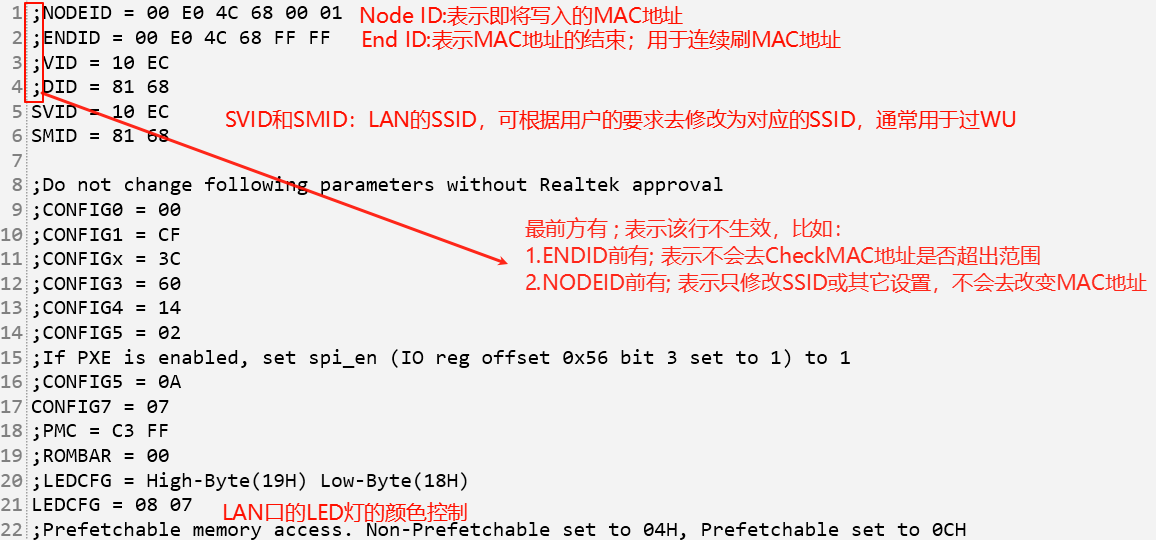
配置文件为 *.cfg
- 8111H 的修改 8168HEF.CFG
- 8111G 的修改 8168GEF.CFG
- 8125 的修改 8125BEF.CFG
大体内容如下:
详细参数内容
通过 RTNicPgW64.exe /? 查询完整的参数信息
title: 总结
总结一下 `RTNicPgW64.exe` 的使用方法:

### 基本用法
`RTNicPgW64.exe` 是 Realtek 网卡编程工具,用于配置网卡的 EEPROM 或 EFUSE。以下是一些基本选项及其用途:

### 常见选项
1. **/h 或 /?**
   - 显示帮助信息。

2. **/v**
   - 查看每个适配器的信息。

3. **/r**
   - 读取 EEPROM 或 EFUSE 内容并输出到标准输出。

4. **/w**
   - 根据配置文件写入 EEPROM 或 EFUSE。这是默认操作,如果没有其他动作指定的话。

5. **/c HexOffset HexValue**
   - 将一个字节值写入 EEPROM 的指定偏移地址。
   - 示例:`RTNicPgW64.exe /c 04 6A`

6. **/d NICNumber**
   - 导出指定 NIC 的 EEPROM 内容到映射文件。
   - 示例:`RTNicPgW64.exe /d 1`

7. **/l**
   - 从映射文件加载 EEPROM 内容。
   - 示例:`RTNicPgW64.exe /l`

8. **/b**
   - 将 EEPROM 内容导出为二进制文件。
   - 示例:`RTNicPgW64.exe /b`

9. **/nodeid HexNODEID**
   - 将 NODEID 编程到 EEPROM 或 EFUSE。
   - 示例:`RTNicPgW64.exe /nodeid 00E04C681234`

10. **/svid HexSVID HexSMID**
    - 将 SVID 和 SMID 编程到 EEPROM 或 EFUSE。
    - 示例:`RTNicPgW64.exe /svid 10EC 0123`

11. **/# NICNumber**
    - 选择多 NIC 中的一个。
    - 示例:`RTNicPgW64.exe /# 1`

12. **/vMAC**
    - 显示每个适配器的 SVID、SDID 和 MAC 地址。
    - 示例:`RTNicPgW64.exe /vMAC`

13. **/cfgnchg**
    - 不改变配置文件。
    - 示例:`RTNicPgW64.exe /cfgnchg`

14. **/direct**
    - 使用直接访问模式访问 PCI 配置空间。
    - 示例:`RTNicPgW64.exe /direct`

15. **/snsub HexVal**
    - 序列号减法。
    - 示例:`RTNicPgW64.exe /snsub 2`

16. **/efuse**
    - 编程 EFUSE。
    - 示例:`RTNicPgW64.exe /efuse`

17. **/eeprom**
    - 编程 EEPROM。
    - 示例:`RTNicPgW64.exe /eeprom`

18. **/manchg**
    - 不改变 MAC 地址。
    - 示例:`RTNicPgW64.exe /manchg`

19. **/barmac**
    - 将手动输入的 NODEID 编程到 EEPROM 或 EFUSE。
    - 示例:`RTNicPgW64.exe /efuse /barmac`

20. **/mapmac MapFile**
    - 将映射文件中的 NODEID 编程到 EEPROM 或 EFUSE。
    - 示例:`RTNicPgW64.exe /efuse /mapmac a.map`

21. **/fmac Version Filename**
    - 将文件中的 NODEID 编程到 EEPROM 或 EFUSE。
    - 示例:`RTNicPgW64.exe /efuse /fmac 1 NodeId.txt`

22. **/nicmac**
    - 将 NIC 的 NODEID 编程到 EEPROM 或 EFUSE。
    - 示例:`RTNicPgW64.exe /efuse /nicmac`

23. **/93c46 /93c56 /93c66**
    - 指定 EEPROM 类型。
    - 示例:`RTNicPgW64.exe /eeprom /93c46`

24. **/cpcfg CfgFileName**
    - 比较配置文件与 EEPROM 或 EFUSE 内容。
    - 示例:`RTNicPgW64.exe /efuse /cpcfg a.cfg`

25. **/eepsize HexSize**
    - 按照指定大小编程 EEPROM。
    - 示例:`RTNicPgW64.exe /eeprom /eepsize 80`

26. **/callbios version**
    - 调用 BIOS。
    - 示例:`RTNicPgW64.exe /efuse /callbios 1`

27. **/snnchg**
    - 不改变序列号。
    - 示例:`RTNicPgW64.exe /snnchg`

28. **/cfgsnchg**
    - 在配置文件中改变序列号。
    - 示例:`RTNicPgW64.exe /cfgsnchg`

29. **/ewgphy HexPageNum HexGPhyReg HexGPhyVal**
    - 通过 EFUSE 设置 GPhy。
    - 示例:`RTNicPgW64.exe /efuse /ewgphy 0 1 1234`

30. **/ewephy HexEPhyReg HexEPhyVal**
    - 通过 EFUSE 设置 EPhy。
    - 示例:`RTNicPgW64.exe /efuse /ewephy 1 1234`

31. **/ewephyh HexEPhyReg HexEPhyVal**
    - 通过 EFUSE 设置 EPhy 主机端。
    - 示例:`RTNicPgW64.exe /efuse /ewephyh 1 1234`

32. **/maciob HexReg HexVal**
    - 通过 EFUSE 或 EEPROM 设置 MacIo(字节)。
    - 示例:`RTNicPgW64.exe /efuse /maciob 1 12`

33. **/macio HexReg HexVal ByteCount**
    - 通过 EFUSE 或 EEPROM 设置 MacIo(最多 4 字节)。
    - 示例:`RTNicPgW64.exe /efuse /macio b0 12345678 4`

34. **/wrpcib HexReg HexVal**
    - 通过 EFUSE 或 EEPROM 设置 PCI 配置(字节)。
    - 示例:`RTNicPgW64.exe /efuse /wrpcib 1 12`

35. **/wrpci HexReg HexVal ByteCount**
    - 通过 EFUSE 或 EEPROM 设置 PCI(最多 4 字节)。
    - 示例:`RTNicPgW64.exe /efuse /wrpci 1 12345678 4`

36. **/wrpcifx HexFuncNum HexReg HexVal ByteCount**
    - 通过 EFUSE 或 EEPROM 设置 PCI 功能 X(最多 4 字节)。
    - 示例:`RTNicPgW64.exe /efuse /wrpcifx 2 1 12345678 4`

37. **/effreep**
    - 将 EEPROM 内容复制到 EFUSE。
    - 示例:`RTNicPgW64.exe /efuse /effreep`

38. **/efwsn**
    - 不跳过将序列号写入 EFUSE。
    - 示例:`RTNicPgW64.exe /efuse /efwsn`

39. **/efcpeep**
    - 比较 EFUSE 和 EEPROM 内容。
    - 示例:`RTNicPgW64.exe /efuse /efcpeep`

40. **/ewmacdbg HexValue**
    - 通过 EFUSE 设置 MACDBG 寄存器。
    - 示例:`RTNicPgW64.exe /efuse /ewmacdbg 21`

41. **/clrpara HexClrParaFlag**
    - 根据 HexClrParaFlag 清除 EFUSE 参数。
    - 示例:`RTNicPgW64.exe /efuse /clrpara 1`

42. **/wa**
    - 在 Windows 平台上进行自动加载。
    - 示例:`RTNicPgW64.exe /efuse /wa`

43. **/nchkac**
    - 在 Windows 平台上跳过检查电源状态。
    - 示例:`RTNicPgW64.exe /efuse /nchkac`

44. **/buspara HexBusNum HexDevNum HexFunNum**
    - 通过输入总线号、设备号和功能号选择要编程的卡。
    - 示例:`RTNicPgW64.exe /eeprom /buspara 3 0 0`

45. **/na**
    - 在编程 EFUSE 或 EEPROM 后不自动加载。
    - 示例:`RTNicPgW64.exe /efuse /na`

46. **/wpgioctl**
    - 通过设备 I/O 控制编程。
    - 示例:`RTNicPgW64.exe /wpgioctl /efuse`

### 总结
通过上述选项,你可以使用 `RTNicPgW64.exe` 工具对 Realtek 网卡的 EEPROM 或 EFUSE 进行各种配置和调试操作。根据实际需要选择合适的选项进行操作。
 PG Mode is not assigned, default set to eeprom.

*************************************************************************
*       EEPROM/EFUSE/FLASH Windows Programming Utility for              *
*     Realtek PCI(e) FE/GbE/2.5GbE/5GbE Family Ethernet Controller      *
*   Version : 2.81.0.06							*
* Copyright (C) 2024 Realtek Semiconductor Corp.. All Rights Reserved.  *
*************************************************************************

Usage:
  RTNicPgW64.exe [/h][/?]
           [/b][/c HexOffset HexValue][/d NICNumber][/l][/r][/w][/v]
           /efuse | /eeprom
           [/# NICNumber] [/nodeid HexNODEID] [/svid HexSVID HexSMID]
           [/vMAC] [/cfgnchg] [/direct] [/manchg] [/barmac] [/mapmac MapFile]
           [/uuid HexUUID] [/snnchg] [/cfgsnchg]
           [/fmac version filename] [/nicmac] [/93c46 | /93c56 | /93c66]
           [/cpcfg CfgFileName] [/eepsize HexSize]
           [/ewephy] [/ewgphy] [/ewephyh] [/maciob] [/macio]
           [/wrpcib HexReg HexVal]
           [/wrpci] [/wrpcifx]
           [/effreep] [/efwsn] [/efcpeep]
           [/callbios version] [/ewmacdbg HexValue] [/clrpara HexClrParaFlag]
           [/snsub HexVal]
           [/wa] [/nchkac] /wrcrsid]
           [/buspara HexBusNum HexDevNum HexFunNum]
           [/na]
           [/wpgioctl]
Option:
      /? --- Display the help message.
      /h --- Display the help message.
      /v --- View information with each Adapter
      /r --- Read EEPROM or EFuse content to standard output.
      /w --- Write EEPROM or EFuse according to configuration file.
             This is the default action if no other action specified.
      /c HexOffset HexValue
         --- Write a byte value into the offset of EEPROM.
             This action only takes effect on first adapter found.
             Example: RTNicPgW64.exe /c 04 6A
      /d NICnumber
         --- Dump one of Multi_NIC EEPROM content into map file.
             Example: RTNicPgW64.exe /d 1
      /l --- Load EEPROM content from map file.
             This action only takes effect on first adapter found.
      /b --- Dump binary data that EEPROM content to bin file.
             This action only takes effect on first adapter found.
      /nodeid HexNODEID
         --- Program NODEID into EEPROM or Efuse.
             This action only takes effect on first adapter found.
             Example: RTNicPgW64.exe /nodeid 00E04C681234
      /svid HexSVID HexSMID
         --- Program SVID and SMID into EEPROM or EFuse.
             Example: RTNicPgW64.exe /svid 10EC 0123
      /#  NICnumber
         --- Select one of Multi_NIC.
             Example: RTNicPgW64.exe /# 1
      /vMAC
         --- Display SVID, SDID and MACID with each Adapter .
             Example: RTNicPgW64.exe /vMAC
      /cfgnchg
         --- Don't Change Configuration File.
             Example: RTNicPgW64.exe /cfgnchg
      /direct
         --- Using Direct Access Mode To Access PCI Configuration Space.
             Example: RTNicPgW64.exe /direct
      /snsub HexVal
         --- Serial number subtraction.
             Example: RTNicPgW64.exe /efuse /snsub 2
      /efuse
         --- Programming EFUSE.
             Example: RTNicPgW64.exe /efuse
      /eeprom
         --- Programming EEPROM.
             Example: RTNicPgW64.exe /eeprom
      /manchg
         --- Don't Change Mac Address.
             Example: RTNicPgW64.exe /manchg
      /barmac
         --- Program Manual-Entered NODEID into EEPROM or Efuse.
             This action only takes effect on first adapter found.
             Example: RTNicPgW64.exe /efuse /barmac
      /mapmac MapFile
         --- Program Map File's NODEID into EEPROM or Efuse.
             This action only takes effect on first adapter found.
             Example: RTNicPgW64.exe /efuse /mapmac a.map
      /fmac Version Filename
         --- Program File's NODEID into EEPROM or Efuse.
             NodeId Format of version 1 is "001122334455".
             This action only takes effect on first adapter found.
             Example: RTNicPgW64.exe /efuse /fmac 1 NodeId.txt
      /nicmac
         --- Program NIC's NODEID into EEPROM or Efuse.
             Example: RTNicPgW64.exe /efuse /nicmac
             Example: RTNicPgW64.exe /eeprom /nicmac
      /93c46
         --- The Specified EEPROM Type is 93c46.
             Example: RTNicPgW64.exe /eeprom /93c46.
      /93c56
         --- The Specified EEPROM Type is 93c56.
             Example: RTNicPgW64.exe /eeprom /93c56.
      /93c66
         --- The Specified EEPROM Type is 93c66.
             Example: RTNicPgW64.exe /eeprom /93c66.
      /cpcfg CfgFileName
        --- Compare CfgFile with EEPROM/Efuse Content.
             Example: Compare Efuse content with a.cfg.
                     RTNicPgW64.exe /efuse /cpcfg a.cfg
      /eepsize HexSize
         --- PG EEPROM according to HexSize.
             Example: PG EEPROM 128 bytes.
                      RTNicPgW64.exe /eeprom /eepsize 80
      /callbios version
         --- Call Bios.
             Example: RTNicPgW64.exe /efuse /callbios 1.
      /snnchg
         --- Don't Change Serial Number.
             Example: RTNicPgW64.exe /snnchg
      /cfgsnchg
         --- Change Serial Number In Configuration File.
             Example: RTNicPgW64.exe /cfgsnchg
      /ewgphy HexPageNum HexGPhyReg HexGPhyVal
         --- Setting GPhy through Efuse.
             Example: Setting GPhy Page 0 Reg 1 Value 0x1234.
                      RTNicPgW64.exe /efuse /ewgphy 0 1 1234
      /ewephy HexEPhyReg HexEPhyVal
         --- Setting EPhy through Efuse.
             Example: Setting EPhy Reg 1 Value 0x1234.
                      RTNicPgW64.exe /efuse /ewephy 1 1234
      /ewephyh HexEPhyReg HexEPhyVal
         --- Setting EPhy Host through Efuse.
             Example: Setting EPhy Reg 1 Value 0x1234.
                      RTNicPgW64.exe /efuse /ewephyh 1 1234
      /maciob HexReg HexVal
         --- Setting MacIo(BYTE) through Efuse or EEPROM.
             Example: Setting MacIo Reg 1 Value 0x12 through Efuse.
                      RTNicPgW64.exe /efuse /maciob 1 12
      /macio HexReg HexVal ByteCount
         --- Setting MacIo(Up to 4 bytes) through Efuse or EEPROM.
             Example: Setting MacIo Reg 0xB0 Value 0x12345678 through Efuse.
                      RTNicPgW64.exe /efuse /macio b0 12345678 4
      /wrpcib HexReg HexVal
         --- Setting PCI Configuration(BYTE) through Efuse or EEPROM.
             Example: Setting PCI Reg 1 to Value 0x12 through Efuse.
                      RTNicPgW64.exe /efuse /wrpcib 1 12
      /wrpci HexReg HexVal ByteCount
         --- Setting PCI (Up to 4 bytes) through Efuse or EEPROM.
             Example: Setting PCI Reg 1 to Value 0x12345678 through Efuse.
                      RTNicPgW64.exe /efuse /wrpci 1 12345678 4
      /wrpcifx HexFuncNum HexReg HexVal ByteCount
         --- Setting PCI function X (Up to 4 bytes) through Efuse or EEPROM.
             Example: Setting PCI function 2 Reg 1 to Value 0x12345678
                      through Efuse.
                      RTNicPgW64.exe /efuse /wrpcifx 2 1 12345678 4
      /effreep
         --- PG EEPROM Content to EFuse.
             Example: RTNicPgW64.exe /efuse /effreep.
      /efwsn
         --- Not Skip Writing SN to EFuse.
             Example: RTNicPgW64.exe /efuse /efwsn.
      /efcpeep
         --- Compare Efuse and EEPROM Content.
             Example: RTNicPgW64.exe /efuse /efcpeep.
      /ewmacdbg HexValue
         --- Setting MACDBG Reg through efuse.
             Example: RTNicPgW64.exe /efuse /ewmacdbg 21.
      /clrpara HexClrParaFlag
         --- Clear Efuse Parameters according to HexClrParaFlag.
            Example: Clear Ethernet Phy parameters.
                      RTNicPgW64.exe /efuse /clrpara 1.
      /wa
         --- Doing Autoload On Windows Platform.
             Example: RTNicPgW64.exe /efuse /wa.
      /nchkac
         --- Bypass Check Power Status on Windows Platform.
             Example: RTNicPgW64.exe /efuse /nchkac.
      /buspara HexBusNum HexDevNum HexFunNum
         --- PG selected card by input bus number, device number
             and function number.
             Example: PG EEPROM to selected card which bus number is 3,
             device number is 0 and function number is 0.
                      RTNicPgW64.exe /eeprom /buspara 3 0 0
      /na
         --- Not autoload after PG Efuse or EEPROM
             Example: RTNicPgW64.exe /efuse /na.
      /wpgioctl
         --- Program through device IO control.
            Example: Programming EFUSE.
                      RTNicPgW64.exe /wpgioctl /efuse.